Function calling: connecting AI to your application
How a language model requests data from your application, how your code handles the request, and how the result becomes a useful answer.
Based on material I shared in a workshop on 20 September 2024, when I was getting started with function calling.
Ask an assistant to show your transactions from last month, and it needs more than a well-written prompt. It needs access to your records and a date range. A confident answer containing transactions it made up would be a fairly annoying feature.
Function calling lets a language model request that information from your application. You describe the functions available to it. The model can then return a function name and arguments, which your code uses to fetch the data. Send the result back, and the model can use it to answer the question.
Let’s build a small example: an assistant that retrieves transactions when you ask for them. I’ll use PHP and the Chat Completions API to show the exchange. Your own application supplies the data.
Start with a question the app can answer
Here is the request:
Show me my transactions for last month.
The model can interpret the wording and identify the information needed. The application holds the user’s records and knows how to retrieve them.
A tool gives those two parts a way to communicate. The assistant requests transactions for a specific period. The backend performs the lookup, and the assistant uses the returned records to answer.
There is still a backend to write. Adding a chat box hasn’t got me out of that part.
Describe the tools your application provides
Each function definition needs a name, a description, and a schema for its arguments. In Chat Completions, those definitions go into the request’s tools list.
For example, getTransactions retrieves transactions for a period. Its arguments are startDate and endDate. Descriptions tell the model what the function does and how to fill in those dates. The function’s implementation stays in your application.
Here is that definition in PHP. The required list describes the expected fields; it does not replace validation in your backend. Check the arguments before using them.
$tools = [
    [
        'type' => 'function',
        'function' => [
            'name' => 'getTransactions',
            'description' => 'Get transactions for a given period.',
            'parameters' => [
                'type' => 'object',
                'properties' => [
                    'startDate' => [
                        'type' => 'string',
                        'description' => 'Start datetime: YYYY-MM-DD HH:MM:SS.',
                    ],
                    'endDate' => [
                        'type' => 'string',
                        'description' => 'End datetime: YYYY-MM-DD HH:MM:SS.',
                    ],
                ],
                'required' => ['startDate', 'endDate'],
            ],
        ],
    ],
];
A simplified view of a request for getTransactions looks like this:
{
  "name": "getTransactions",
  "arguments": {
    "startDate": "2024-08-01 00:00:00",
    "endDate": "2024-08-31 23:59:59"
  }
}
This summary shows the function name and parsed arguments; the full API response has additional fields. The model is asking the application to look up transactions for August. Your code still has to run the function and return the result.
For me, this connected a new kind of interface to familiar application code. A function receives inputs, does some work, and returns data. The model helps turn a sentence into a request that code can handle.
Follow the request through the application
The application and model take turns. The model requests a function, the application runs it, and the result goes back into the conversation.
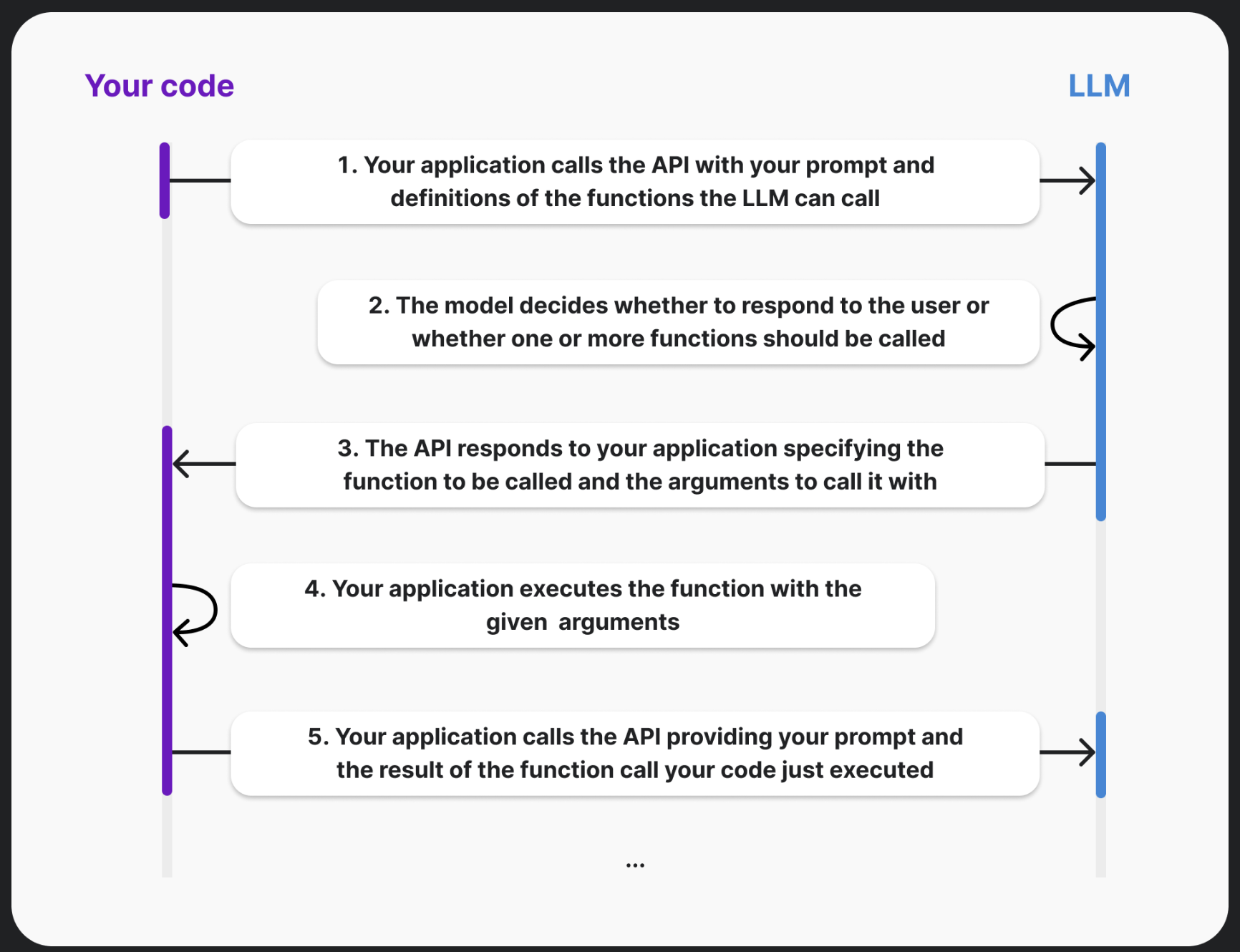
The request crosses between application code and the model twice. Tap the diagram for the full-size version.
A tool-assisted answer takes a round trip:
- Send the conversation and available tool definitions to the model.
- Receive its response, which may contain an answer or one or more tool calls.
- Read each requested function name and decode its arguments.
- Validate the request, run the allowed function, and collect its result.
- Send the results back so the model can continue the conversation.
In Chat Completions, keep the assistant message containing the tool calls in the conversation. For each call, append a message with role: "tool", its result, and the matching tool_call_id. That ID connects the application’s result to the request that asked for it. The function-calling guide explains the message exchange.
Send the question and available tools
The following excerpts use the community-maintained OpenAI PHP client. $client is an authenticated client, $model is your configured Chat Completions model with tool support, and $currentUser comes from your application’s authenticated session.
The four PHP blocks belong in the same request handler, in the order shown. Client setup, authentication, and database access depend on your application.
$messages = [
    [
        'role' => 'system',
        'content' => 'You help users understand their transactions. '
            . 'The current date is 2024-09-20, and dates use UTC. '
            . 'Use the available tool for transaction data.',
    ],
    [
        'role' => 'user',
        'content' => 'Show me my transactions for last month.',
    ],
];

$response = $client->chat()->create([
    'model' => $model,
    'messages' => $messages,
    'tools' => $tools,
]);

$message = $response->toArray()['choices'][0]['message'];
$messages[] = $message;
$toolCalls = $message['tool_calls'] ?? [];
Keep that assistant message. It contains the IDs of any requested tool calls, and the next messages need to answer those specific requests. The fixed date and UTC timezone make this example repeatable; a running application would supply its current date and the timezone used by its date-range helper.
Run the requested function
Each call carries a function name and a JSON string containing its arguments. Decode the string, validate the dates, and dispatch the function explicitly.
foreach ($toolCalls as $toolCall) {
    $functionName = $toolCall['function']['name'];
    if ($functionName !== 'getTransactions') {
        throw new RuntimeException('Unsupported tool.');
    }

    $arguments = json_decode(
        $toolCall['function']['arguments'],
        true,
        512,
        JSON_THROW_ON_ERROR,
    );

    $range = validateDateRange($arguments);
    $transactions = getTransactionsForUser(
        $currentUser,
        $range['startDate'],
        $range['endDate'],
    );

    $messages[] = [
        'role' => 'tool',
        'tool_call_id' => $toolCall['id'],
        'content' => json_encode($transactions, JSON_THROW_ON_ERROR),
    ];
}
validateDateRange and getTransactionsForUser are application-owned helpers, not SDK methods. The first must check the input types, date format, range order, timezone, and allowed query span. The second must enforce the signed-in user’s access and return only the records needed for the answer. They are left as integration points here because their implementation depends on your backend.
Loop over every requested call, even if this example usually needs only one. Match each result to its tool_call_id. A model-generated argument should never decide whose account the caller is allowed to read.
Send the results back and get the answer
If the model answered directly, there are no tool results to submit. Otherwise, make a second request with the updated conversation.
if ($toolCalls === []) {
    return $message['content'] ?? '';
}

$finalResponse = $client->chat()->create([
    'model' => $model,
    'messages' => $messages,
    'tools' => $tools,
    'tool_choice' => 'none',
]);

return $finalResponse->choices[0]->message->content ?? '';
This short example allows one round of tool execution, then uses tool_choice: 'none' to request an answer without further calls. A more involved conversation can allow additional rounds, with a limit on how many it runs. Empty or filtered responses still need the fallback handling described below.
The chat interface can feel conversational while the code underneath remains quite ordinary: parse inputs, check permissions, fetch data, and return a result.
Give “last month” a reference point
On 20 September 2024, “last month” means August. That is why the example passes an August date range to getTransactions.
Supply the current date and time when a question depends on them. Without a clock or another reliable source of current time, the model cannot consistently work out which period the user means.
A fluent answer about the wrong month would still be wrong. It would just read nicely.
The application also needs a consistent timezone for interpreting dates. This example uses UTC and inclusive boundaries at whole-second precision. If your database stores fractional seconds, prefer an exclusive end boundary at the start of the next month: query timestamp >= startDate AND timestamp < endDate. Update the tool description and date-range helper to use that same convention. Either way, validate the range before querying records.
Keep tone separate from the lookup
You can give the assistant a plain, friendly, or slightly cheeky voice. Those instructions affect how it explains the result.
The returned records stay the same. Changing the tone should leave the underlying lookup and numbers alone.
Keep its role narrow: retrieve and explain the records it receives. If the information needed for an answer is missing, it should say so. Those instructions describe the assistant’s behaviour; account access and permissions still need enforcement in application code.
I can ask an assistant to sound friendlier in a prompt. I still need the backend to make sure it fetches the right person’s data.
Plan for a lookup that fails
A rate limit, a filtered response, or a failed backend request can interrupt the conversation. Give the user a clear explanation and, where appropriate, a way to retry. If the transaction lookup fails, the assistant has no basis for inventing records.
It also helps to distinguish an empty result from a failed request. “No matching transactions” and “we couldn’t retrieve your transactions” mean different things.
When debugging an answer, follow the same path as the request. Check which function was selected, which dates it received, whether the lookup succeeded, and whether the model received the result. That narrows the problem down before you start rewriting the prompt.
Log enough to follow that path. Function names, timings, and error categories are useful; whole transaction histories usually don’t belong in general-purpose logs. If the assistant answers a September question using July’s records, the requested date range is a better place to start than its choice of words.